
LASER DECIDE
Credit decisioning software that explains every result.
LASER DECIDE checks each credit report against the decision rules your credit team sets up. The result appears on the Salesforce record within seconds, along with every condition that was checked and the value found on the report.
4.8760 reviews on Salesforce AppExchange| Decision Rule Variable | Condition | Result | Actual Value |
|---|---|---|---|
| Credit Score | ≥ 500 | 688 | |
| Trade Line Average Age In Months | ≥ 36 | N/A | |
| Trade Line with utilization | ≤ 3 | 3 | |
| Delinquent Trade Lines Number | ≤ 2 | 0 | |
| Collection Number | ≤ 4 | 0 |
What is credit decisioning software?
Credit decisioning software compares a credit application to a lender’s credit policy and returns a consistent result. It reads data from the credit report, checks that data against the rules you define, and records why the application passed or didn’t.
Without it, an underwriter reads each report and applies the policy from memory or a checklist. Software applies the same rules to every report in the same way, and keeps a record of each check. Two applicants with the same credit profile get the same result.
If you’re still getting familiar with the term, our article on what credit decisioning is covers the basics.
Step 1
The credit report comes in
The report is pulled from your bureau or credit reporting agency and parsed into Salesforce.
ACCESSStep 2
Variables are checked
Each variable in the decision rule, such as credit score or collections, is compared to its condition.
DECIDEStep 3
The rule logic is applied
The results are combined the way the rule specifies, for example requiring all conditions to be met.
DECIDEStep 4
The result lands on the record
Your team sees the outcome and every condition behind it.
AcceptedWarningError
Consistency of Process: Identical loans scored identically.
Rules built from your credit policy
Start from more than 1,000 pre-built credit variables, such as credit score, collections, delinquent trade lines, and inquiries, and set the condition each one has to meet.
A rule for each loan program
Create separate decision rules for loan products, referral partners, pricing tiers, or record types. A file can be re-run against a different rule whenever you need it.
Runs when the report arrives
Evaluations can start automatically as soon as a credit report is pulled, or with a single click on the record.
Color-coded results
Each evaluation returns Accepted, Warning, or Error, so loan officers can see at a glance which files are ready to move forward.
Every condition shown
The evaluation lists each variable, the condition it had to meet, whether it passed, and the actual value from the report.
Test your policy on past reports
Run batch evaluations on historical credit data to see how your current or proposed rules would have performed.
How does DECIDE work with ACCESS and COMPLY?
ACCESS brings the credit report into Salesforce. DECIDE checks it against your decision rules. COMPLY documents consent and permissible purpose and runs KYC/AML screening around each pull. Together they make up the LASER Credit Access platform.
Where does decisioning fit in the credit process?
Decisioning is one step in a longer process. Here’s how each step is handled when LASER Credit Access runs in your Salesforce org.
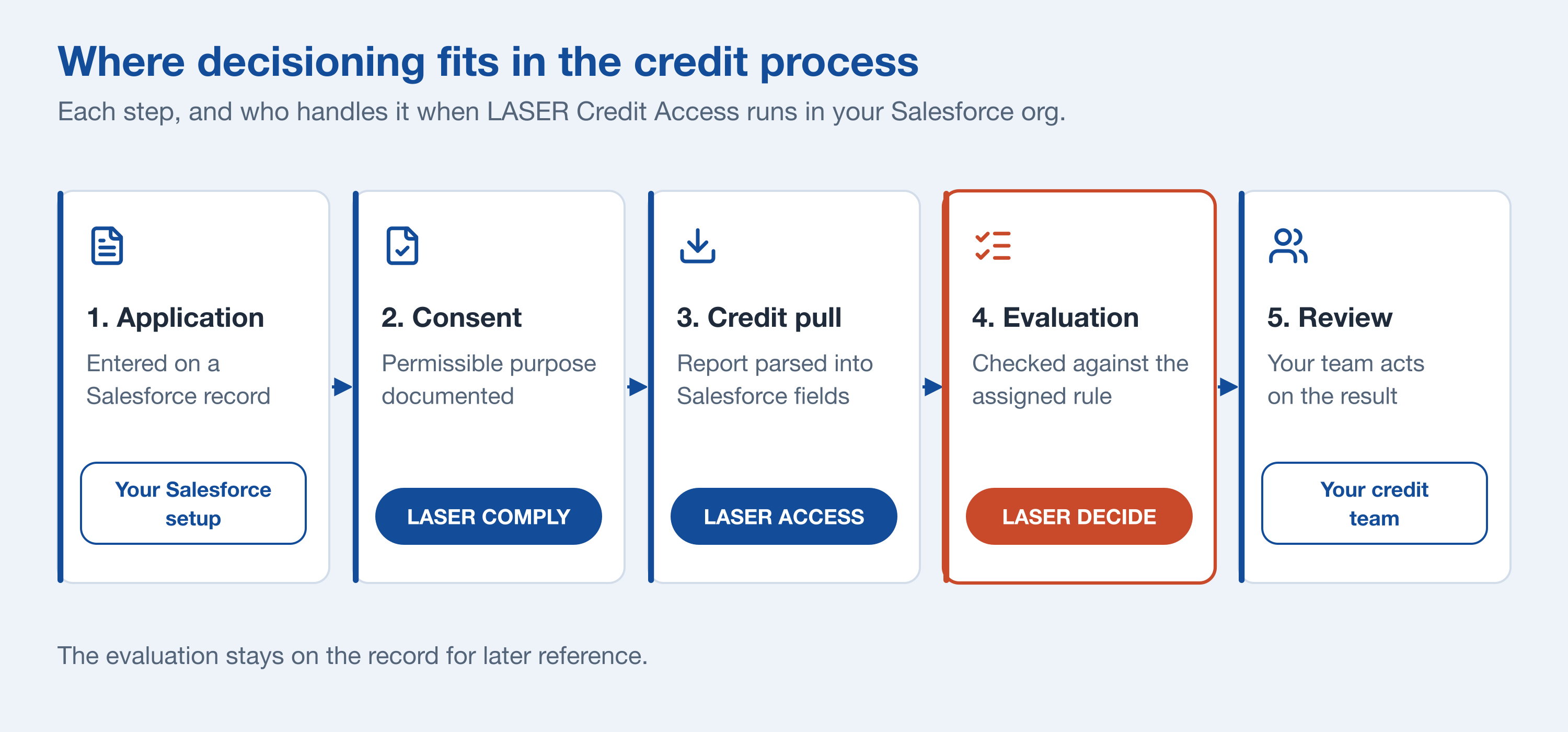
| Step | What happens | Who handles it |
|---|---|---|
| 1. Application | The application is entered on a Salesforce record, such as a Lead, Account, Opportunity, or custom loan object. | Your existing Salesforce setup |
| 2. Consent | Consent and permissible purpose are documented on the record before the report is requested. | LASER COMPLY |
| 3. Credit pull | The credit report is requested and parsed into Salesforce fields. OFAC screening can run at the same time. | LASER ACCESS |
| 4. Evaluation | The report is checked against the decision rule assigned to the file. | LASER DECIDE |
| 5. Review | Your team acts on the result. The evaluation stays on the record for later reference. | Your credit team |
How does DECIDE work inside Salesforce?
Setup happens on the LASER configuration page inside Salesforce, and no code is required. There are three parts to a decision rule.
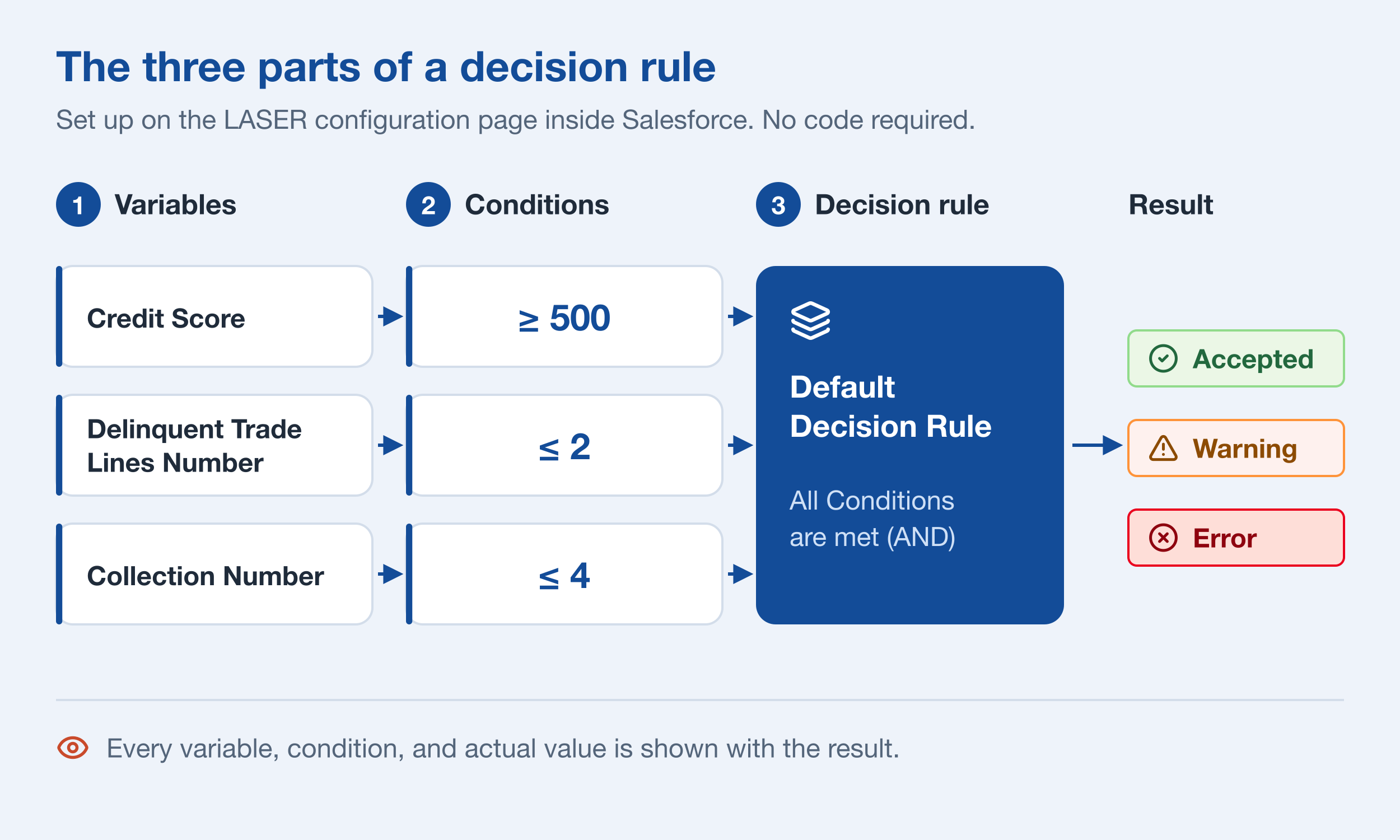
1. Choose your variables
Variables are the questions DECIDE asks of a credit report. They draw on public records, trade lines, collection items, inquiries, and scores. You can pick from the pre-built list or narrow a variable by loan type, account type, and account status.
Many variables have settings your team fills in to match your policy.
2. Set the conditions
Give each variable the condition it has to meet, such as a credit score of 500 or higher, or no more than two delinquent trade lines. Your credit team decides every threshold.
3. Group them into a decision rule
Combine your conditions into a decision rule and choose how they're evaluated, for example requiring all conditions to be met. Build as many rules as you need, one for each loan product, referral partner, loan program, or record type. Rules can also be grouped into sets so a single report is checked against several of them at once.
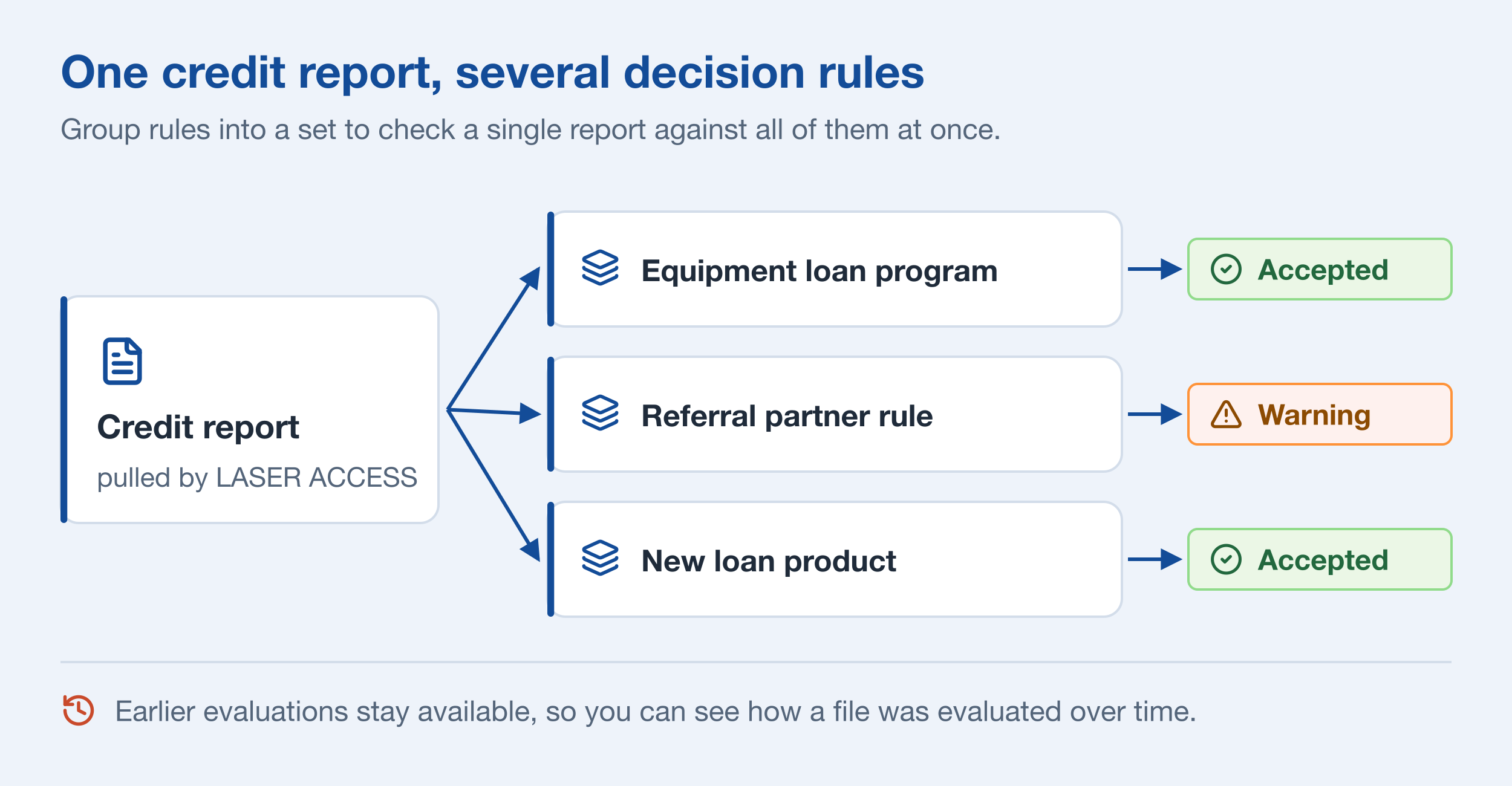
Reading the result
After a report is evaluated, the Decision Engine Evaluation component shows the outcome on the record. It lists the rule that ran, when it ran, each variable and condition, whether it passed, and the value found on the report. Earlier evaluations stay available in the dropdown, so you can see how a file was evaluated over time. The component can be placed on whichever Salesforce object your team works from.
Testing a policy change
Batch evaluations let you run decision rules against historical credit data. You can see how your policy has performed over a period of time and fine-tune thresholds before applying them to new applications.
What does this mean for compliance?
DECIDE gives you a consistent, documented basis for each credit decision. Every report assigned to the same rule is checked the same way, and the evaluation shows which conditions were and weren’t met. That supports the consistency fair lending reviews look for, and gives your team the specific facts behind a decision when preparing an adverse action notice under ECOA and Regulation B (12 CFR 1002.9).
Because the credit data and the evaluation both stay in Salesforce, fewer systems hold customer information that has to be secured under the GLBA Safeguards Rule (16 CFR Part 314). LASER supports these obligations. It doesn’t replace your compliance program or legal counsel.
Is credit decisioning the same as automated underwriting?
The two terms are often used for the same thing. Credit decisioning usually describes turning credit data into a result for any credit product. Automated underwriting more often means reviewing a new loan application against underwriting policy.
DECIDE handles both. For more on the underwriting side, see automated underwriting software.
Who is DECIDE built for?
Lenders who need to apply one credit policy consistently and be able to explain each result.
Credit unions
Apply one credit policy the same way across every branch and loan officer, with the evaluation saved on each member's record.
CDFIs and mission lenders
Keep a clear record of how each application was evaluated, ready for funders and examiners.
Equipment and specialty lenders
Set up separate decision rules for each program or referral partner, so every broker's deals are checked against the right criteria.
Banks launching new products
Add a decision rule for a new loan product without custom development or another system to manage.
Frequently asked questions
What is credit decisioning software?
Credit decisioning software checks a credit application against a lender's credit policy and returns a consistent result. It reads data from the credit report, applies the lender's rules, and records why each application passed or didn't.
What is automated credit decisioning?
Automated credit decisioning means software applies your credit policy to each credit report, so a person doesn't have to check every file by hand. With LASER DECIDE, the evaluation can run automatically when a report is pulled. Files that come back with a Warning or Error are easy for your team to spot and review.
Is credit decisioning software the same as a loan origination system?
No. A loan origination system (LOS) manages the full loan lifecycle, including intake, documents, funding, and servicing. LASER DECIDE handles the credit evaluation step and works alongside your LOS. If your LOS runs on Salesforce, DECIDE runs on the same records.
What credit data can decision rules use?
Decision rules use data from the credit report, including credit scores, trade lines, collections, public records, and inquiries. LASER ACCESS pulls the report from your credit bureau or credit reporting agency and parses it into Salesforce, so DECIDE works from the same report your team sees.
Can we change decision rules without involving IT?
Yes. Decision rules are built and edited on the LASER configuration page inside Salesforce. Changing a threshold or adding a condition doesn't require code.
What results can an evaluation return?
Accepted, Warning, or Error. Each result is color-coded and comes with the list of conditions that were checked and the actual values found on the credit report.
Can one file be evaluated against more than one decision rule?
Yes. You can assign a different decision rule and run the evaluation again, or group rules into a set and check a report against all of them at once. This helps when one application could fit more than one loan program.
How does DECIDE help with ECOA and Regulation B?
DECIDE applies the same rule to every report assigned to it and records which conditions were and weren't met. That consistency supports fair lending review, and the evaluation gives your team the specific facts behind a decision when preparing an adverse action notice. Under Regulation B (12 CFR 1002.9), creditors generally must notify an applicant of the action taken within 30 days of receiving a completed application. LASER supports these obligations but doesn't replace your compliance program or legal counsel.
How fast is an evaluation?
The evaluation runs as soon as the credit report comes back, so the result is ready in about the time it takes to pull the report.
Does credit decisioning software replace our underwriters?
No. DECIDE handles the routine work of checking each report against your policy. Your underwriters still own the policy and make the call on files that need a closer look.
See DECIDE evaluate a live credit report.
We’ll build a decision rule from your credit policy and run it inside Salesforce.